

Introducing Fastweigh MCP
We’re excited to announce the Fastweigh MCP server, a new way to work with your Fastweigh data from the AI assistant you already use.
If you have ever known the answer was somewhere in Fastweigh but didn’t have time to look for it, this connection is designed for that. It gives you a direct way to ask questions, explore your data, prepare supported changes, and get work done without interrupting what you are already doing.
You don’t have to be on a Fastweigh screen to work with your Fastweigh data
Fastweigh MCP connects Fastweigh to your choice of AI assistant, including Claude, ChatGPT, and Microsoft Copilot. Open your assistant as usual, ask a question in plain language, and have it retrieve the relevant Fastweigh records available to you. With the right access, you can also prepare supported changes there and approve them before they are saved.
MCP stands for Model Context Protocol, an open standard that allows AI applications to work with outside systems. In practical terms, it gives your assistant a secure route to the operational information already in Fastweigh.
Get answers from your material data
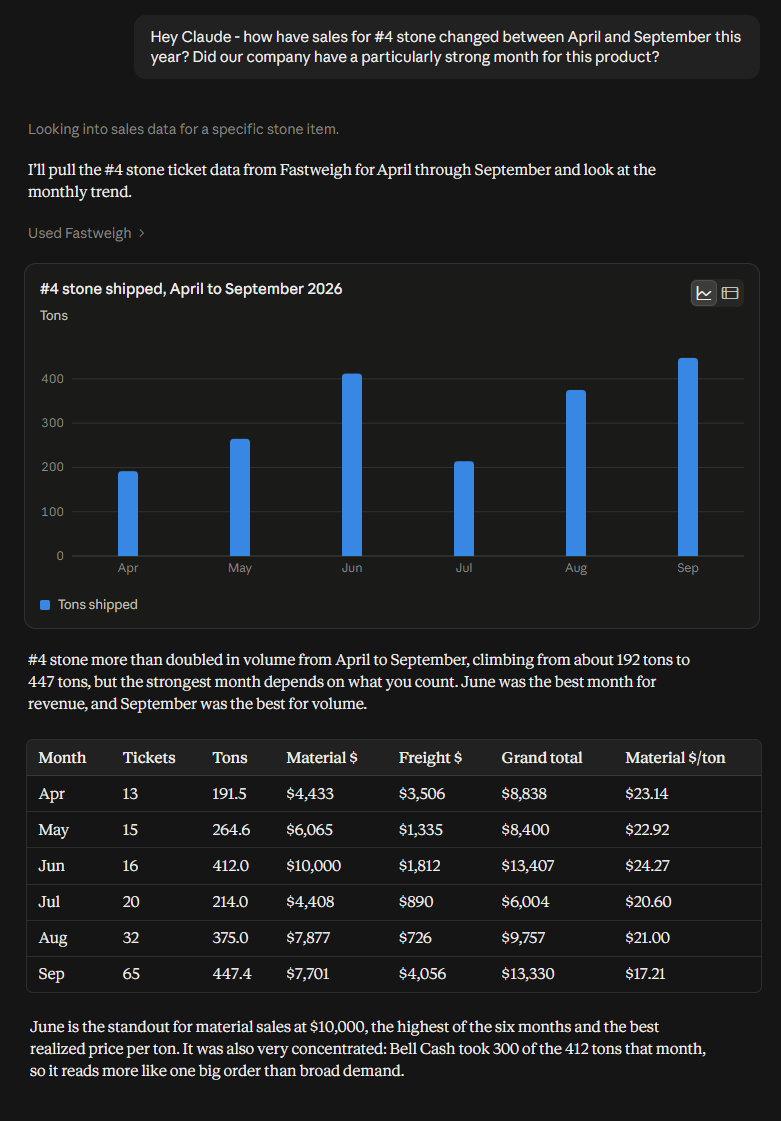
In one test, we asked Claude how sales of #4 stone changed between April and September. Claude pulled the ticket data from Fastweigh, charted monthly tons, built a table with ticket counts and sales totals, and pointed out the strongest months for volume and revenue. We never had to leave the conversation to run a separate report.
That’s just one example. You could ask for outbound tonnage across several locations, look up the customer and truck associated with a ticket, or find customers that have not hauled during a particular period. Then keep going. Narrow the dates, compare locations, or ask to see the individual records behind a total.
Questions and reports are read-only. Looking at the data does not change it.
See your data in the format that works for you
Some AI assistants can also build interactive pages and tools from the information they retrieve. Fastweigh MCP can supply the operational data behind a focused dashboard or workflow without requiring your team to export a spreadsheet first.
A dispatch team might build a view of open requests and fulfillment status. An operations manager could group production by location, customer, order, and product, then drill into the records that need attention. Fastweigh remains the source, so the entire team works from the same operational data.
Review before approving changes
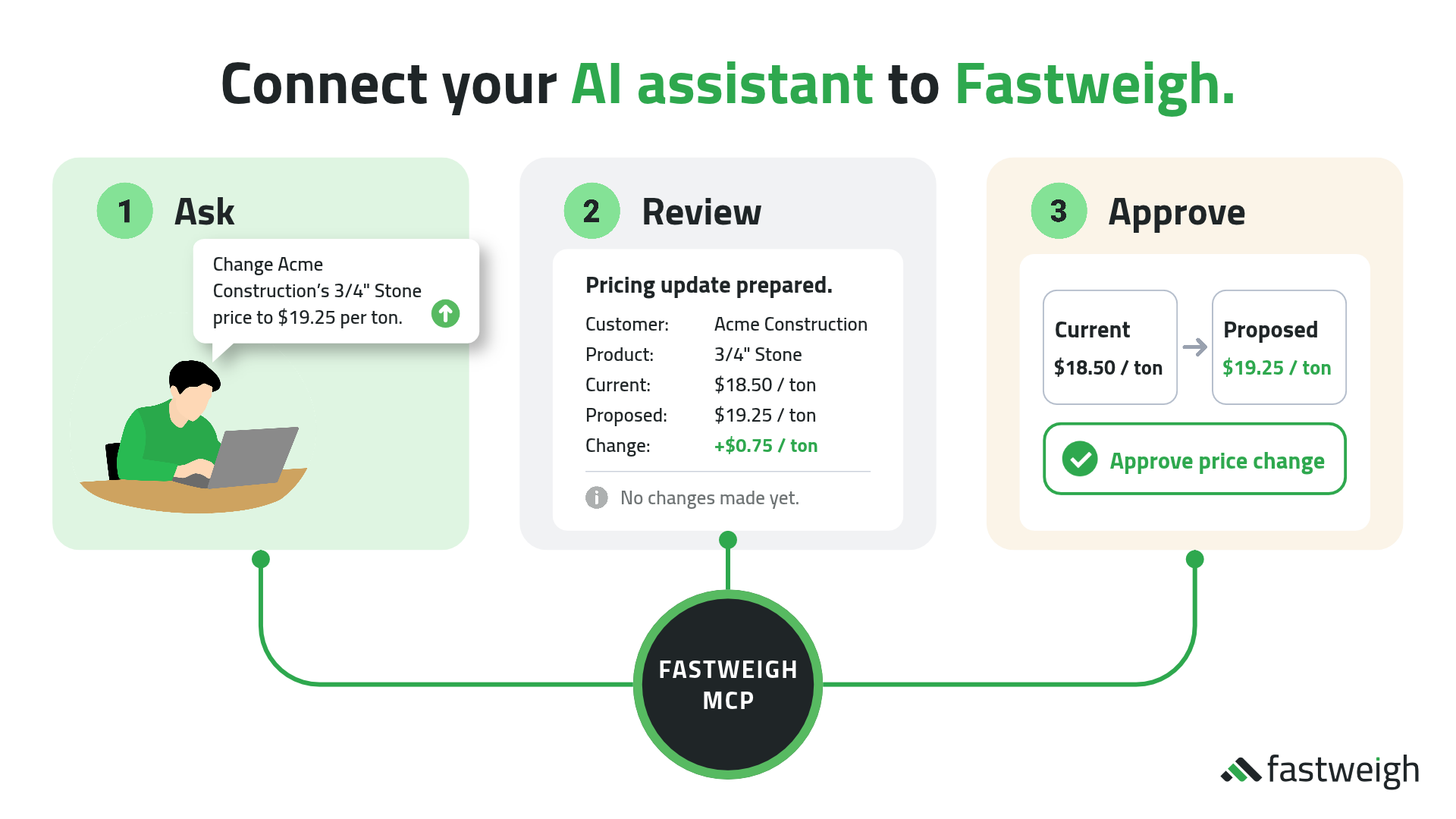
With read-and-write access, an assistant can prepare changes to a defined set of records. That includes customers, orders, requests, trucks, drivers, and product pricing templates, among others.
Consider the pricing example shown here. A user asks to change Acme Construction’s price for 3/4-inch stone from $18.50 to $19.25 per ton. Fastweigh returns the current price, the proposed price, and the $0.75 difference for review. At that point, nothing has changed.
The user can approve or cancel that exact proposal. If it is approved, Fastweigh checks the user’s access again, confirms that the underlying record has not changed during the review, saves the update, and reads it back to verify the result.
There are firm limits. MCP cannot change, reprice, or void load tickets, and it cannot delete records. Adding a field elsewhere in Fastweigh does not automatically make that field editable through an assistant.
Access still comes from Fastweigh
Your AI assistant cannot bypass Fastweigh permissions. The connection uses a Fastweigh user account, single sign-on, or a tenant API key. The assistant receives only the access available to that account or key.
Read access covers questions, reports, dashboards, and analysis. Read-and-write access adds the ability to prepare supported changes, subject to the review and approval step described above.
Getting started is easy
Need help? The Fastweigh MCP setup page explains how to connect Fastweigh to Claude, ChatGPT, Microsoft Copilot, and other compatible applications. The full Fastweigh MCP guide includes example questions, dashboard ideas, supported record changes, access details, and troubleshooting guidance.
If you are testing MCP for the first time, start with a ticket you know or a short date range you can check against Fastweigh. Once the connection is working the way you expect, widen the question or try building a focused dashboard. Fastweigh stays available inside the AI tools where your team is already asking questions and getting work done.
We’re looking forward to seeing how customers use MCP in their day-to-day work. If you need help getting connected, our Support team is ready to help.
Thanks for building with us. More to come!
—
Eric Wilhite
Director of Product
Fastweigh

.jpg)
.jpg)
.jpg)